Shift planning software that forecasts demand and publishes by the rules

  • AI staffing demand forecast
  • Cost-led and preference-led plans
  • Publishing blocked on hard breaches
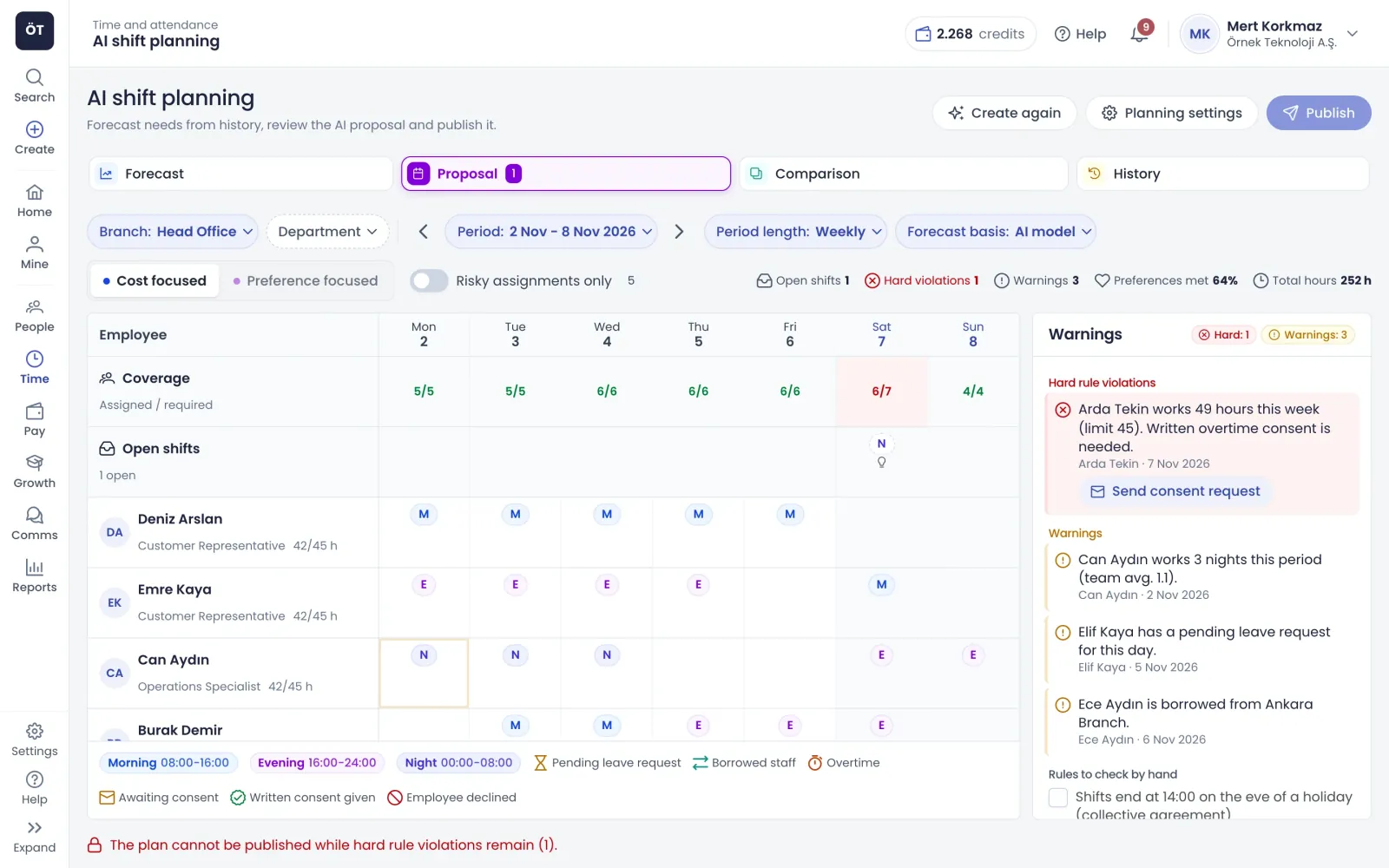
AI shift proposal: weekly plan, coverage and rule warnings
What's inside

What our shift planning software does

Plan with AI suggestions or by hand: shifts pass through the same rules and, once shared, flow into timesheets and attendance.

Forecast

Forecast staffing needs from what actually happened

Pick a branch, period and period length and you see required and expected headcount for each day and shift type with a confidence range, next to last period and last year's actuals. Actuals come from attendance check-ins or planned shifts. For events the model cannot know about, such as a campaign week, you override the forecast and give a reason.

  • Weekly, monthly or quarterly planning periods
  • AI model, recent periods or same period last year
  • Forecast error shown openly on screen
  • Overrides feed back into later forecasts
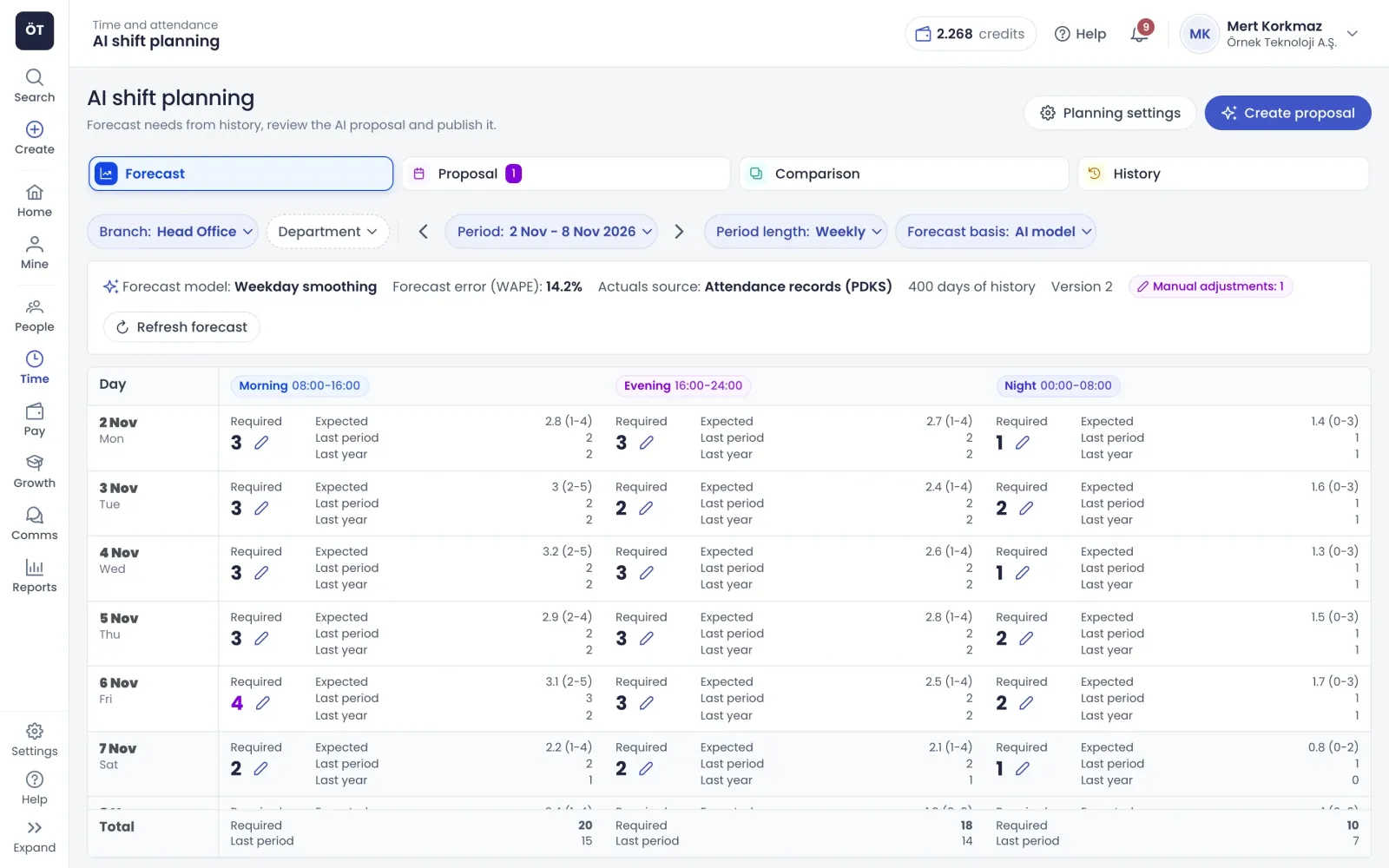
Shift demand forecast: required headcount per day and shift
Suggestions

Compare two plans and see why each person was picked

Create Suggestion builds two plans for the same period. The cost-led plan fills contract hours and cuts overtime and borrowed staff; the preference-led plan puts employee preferences and fair distribution first. Click any assignment to see its reasoning, score components and alternative candidates, and swap in someone else with one click.

  • Coverage row shows assigned versus required headcount
  • Suggested fixes for shifts left open
  • Filter to show risky assignments only
  • Comparison of cost, overtime and fairness metrics
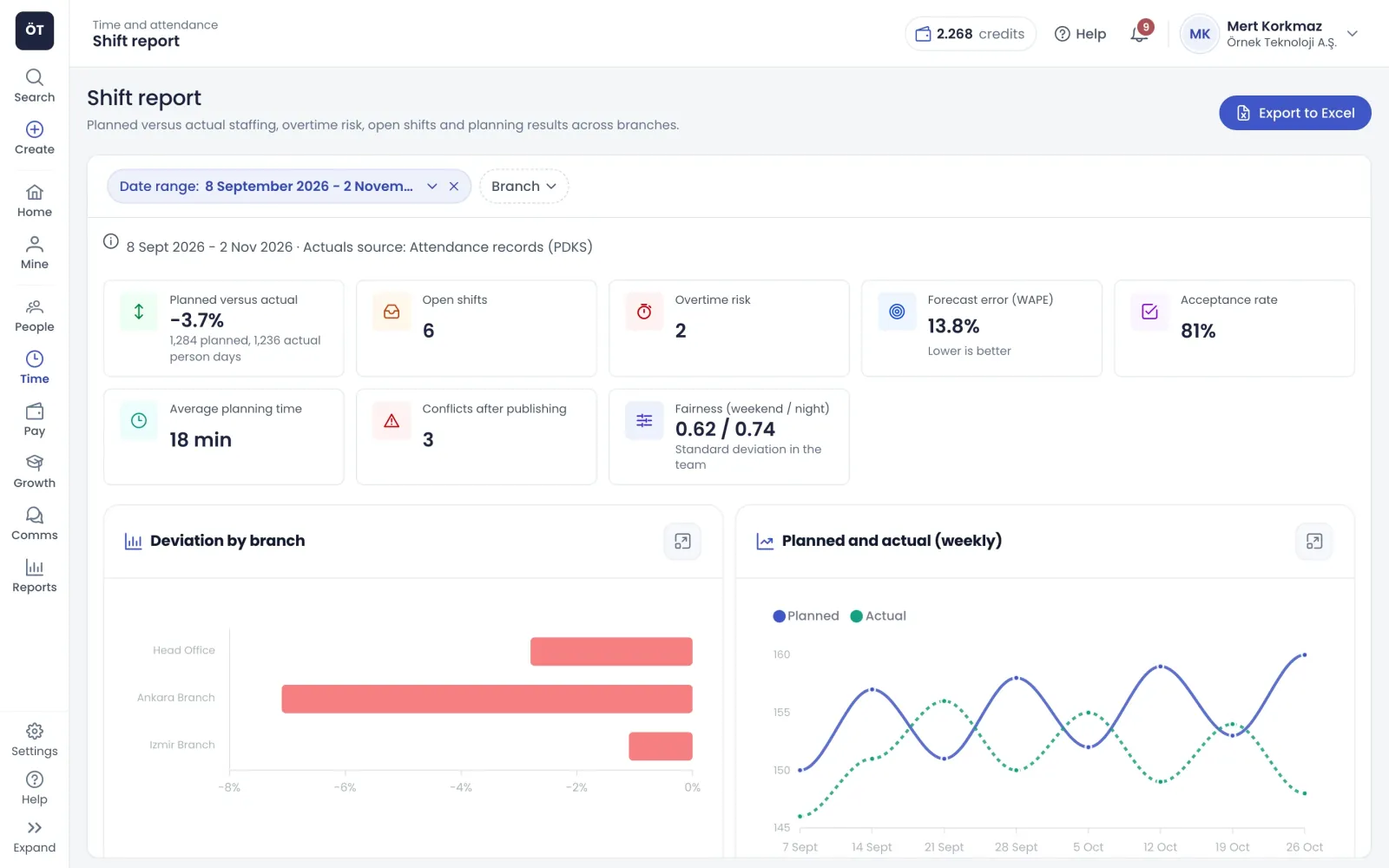
Shift report: planned versus actual deviation, open shifts and overtime risk
Rules

A plan that breaks the rules does not get published

The warnings panel separates hard breaches from softer warnings. For an assignment over 45 hours a week or 7.5 hours of night work, you send the employee a written consent request as an e-document, which they approve with an SMS code. Once no hard breach remains, the plan is published to the rota and assigned employees are notified.

  • Employees on approved leave or sick notes are not suggested
  • Backup candidates offered when leave clashes after publishing
  • Collective agreement rules listed for manual checking
  • Publishing archives other drafts for the same period
Manual planning

Rota, templates and employee preferences

Teams that do not use AI suggestions still get a full set of planning tools.

Shift rota

In a monthly or weekly view you add shifts for one employee or many at once. New shifts stay as drafts and become planned timesheet hours once shared. A week of shifts can be copied to another week, and the rota downloads to Excel.

  • Night shifts running into the next day supported
  • Clashing records highlighted in their own colour
  • Planners without share rights can notify a manager

Shift settings and templates

Daily, weekly and monthly maximum hours, consecutive working days, night hours and rest, and tiered break rules are set in shift settings. A shift that breaks a rule is not saved. Weekly templates are applied to chosen employees over date ranges.

  • Three-tier mandatory break rule
  • Option to lock plans at month end
  • E-mail and SMS reminders before a shift

Employee preferences

Employees record dates they are unavailable, a weekday they are never available, and shifts they prefer or want to avoid. Their shift distribution card compares weekend, night and holiday shifts with the team average.

  • The preference-led plan uses these entries
  • Employees see how often preferences were met
  • Team average shown for teams of three or more

Shift report

Track planned versus actual variance, open shifts, overtime risk, forecast error, suggestion acceptance, average planning time, clashes after publishing, and how fairly weekend and night shifts are spread, for the branches you select.

  • Variance by branch and weekly charts
  • Table of employees at overtime risk
  • Export the report to Excel
How it works

A published shift plan in four steps

  1. Define the rules

    Save working time limits, night work, break and planning rules in shift settings before you start.

  2. Forecast demand

    Pick the branch and period, review required headcount and override the forecast for known special events.

  3. Refine the suggestion

    Compare the cost-led and preference-led plans, change risky assignments and request written consent where needed.

  4. Publish the plan

    Publish once no hard breach remains; shifts are shared, employees are notified and timesheet plans update.

FAQ

Frequently asked questions about Shift planning software

Contact us
How does shift planning software forecast staffing needs?

It looks at actual data for the chosen branch and period, taken from attendance check-ins or planned shifts. You can base the forecast on the AI model, a number of recent periods or the same period last year. If a branch has less than three months of history, the forecast starts from similar branches and is labelled low confidence.

Are AI shift suggestions published automatically?

No. A suggestion starts as a draft, a planner reviews it, adjusts assignments if needed and then publishes. A suggestion with hard rule breaches cannot be published, and if open shifts remain you must accept that explicitly in the publish dialog. Published assignments are added to the rota as shared shifts and employees get an in-app notification.

What is the difference between the cost-led and preference-led plans?

The cost-led plan aims to fill contract hours and reduce overtime and staff borrowed from other branches. The preference-led plan prioritises the preferences employees have entered and a fair spread of weekend and night shifts. The comparison tab puts both side by side on cost hours, overtime, preferences met, open shifts and more.

What happens to shifts that exceed working time limits?

For manually added shifts, a record that breaks a rule in shift settings is not saved and the reason is shown. In AI suggestions, breaches appear in the warnings panel. For assignments over 45 hours a week or 7.5 hours of night work you can send a written consent request; if the employee agrees the item no longer blocks publishing.

What if someone takes leave after the plan is published?

If leave or a sick note is entered after publishing, a red warning appears on the plan and the publisher plus the branch planners are notified. The clash view lists backup candidates who can step in without breaking any rule. Picking one changes only that shift, and the rest of the plan stays as it was.

Can employees enter shift preferences?

Yes. Employees record unavailable dates, a weekday they are never available, and shifts they prefer or want to avoid. The preference-led plan uses this input. Each employee can compare their own weekend, night and public holiday shift counts with the team average and see how often their preferences were met.

Does AI planning use health or leave type data?

No. The planning engine receives no leave type, sick note reason or health data; it only knows whether an employee is available that day. People on approved leave or sick notes are not suggested for those days, and an assignment to someone with pending leave is flagged as risky. The preference screen also reminds employees not to add health details to notes.

Get started with Shift planning software

Try it free or explore the product with our team.

Request a demo