
Performance management software for goals and competencies

  • Weighted goals with automatic scoring
  • 90, 180, 270 and 360 degree reviews
  • Goal entry and approvals on mobile
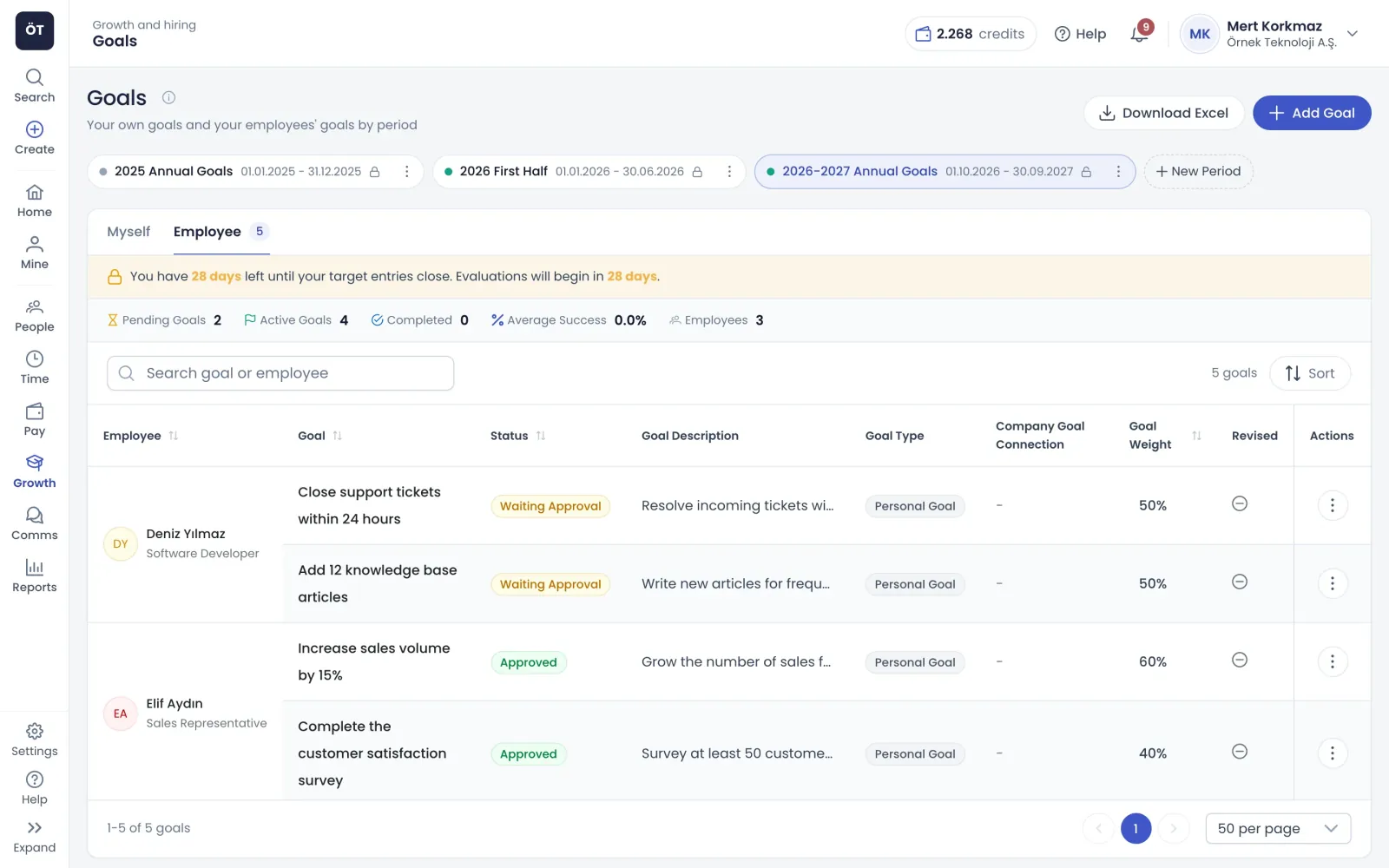
Goals: employee goals, weights and approval status
What's inside

What the performance management module includes

Goal periods and competency periods run independently, so you can use both or just one.

Goals

Period goals, manager approval and scoring

For each period you set the dates, the goal entry window, who enters goals and actual values, the minimum number of goals and the rating scale. Employees add goals with a measurement type, bring weights to one hundred percent and send them to their manager, who approves as is or revises and approves. At period end, scores are calculated from the values entered.

  • Goals still unapproved when the window closes are excluded
  • Evaluation results can pass through an approval chain
  • Admins can correct period scores and export to Excel
  • Admins get an email with missing evaluations after the period
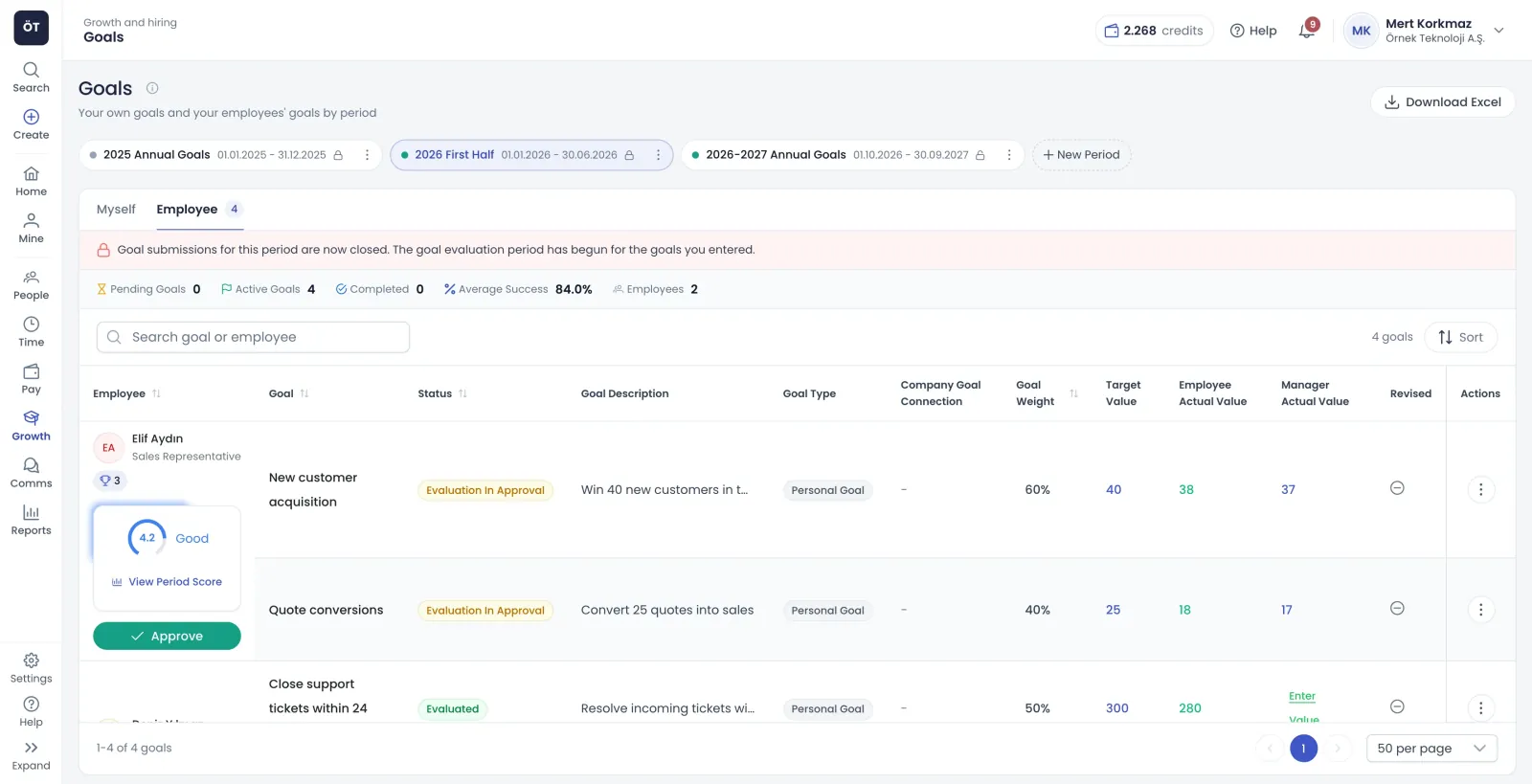
Goal evaluation: target and actual values with period score
Goal groups

Company, branch and department goal templates

On the goal groups screen, define company, branch and department goals as groups and add goal templates with weights already distributed. Employees and managers pick a template when entering goals, so goals in the same department share a common frame. If the period allows it, managers enter goals for their team directly and those goals start approved.

  • The default scale has five levels scored one to five
  • A lock icon shows whether goal entry is open
  • Goals of employees without a manager are approved automatically
Competencies

Competency reviews with a six-step wizard

Question templates define competencies, questions and answer scores. In the period wizard you choose the review type: 90 degree self review, 180 adds the manager, 270 adds direct reports and 360 adds peers in the same branch, department and position. Set role weights, reminder frequency and distribution, and reviewers are found automatically from your organisation.

  • Different groups can get different question sets
  • Comments from reports and peers can be anonymous
  • Reports show each person's score per competency and overall
Roles

Who does what in a performance cycle

Manager is not a separate permission: whoever is set as manager on an employee's position record counts as their manager.

Employee

Enters goals during the entry window and sends them for approval, then enters actual results after the window closes. Completes assigned self, manager, report or peer reviews from the Assigned to Me tab, saving drafts and submitting later.

  • Sees competency scores on My Results
  • Goal entry works in the mobile app
  • Can add goals through Teamso MCP

Manager

Sees the team's goals, approves or revises incoming goals and, if the period allows, enters goals for the team. At period end enters their own actual value, which the goal score is calculated from.

  • Gets an email when goals arrive for approval
  • Can approve team goals through an AI assistant
  • Enters manager values in the table view

Performance admin

Manages goal periods and goal groups, follows every goal in the company and corrects period scores when needed. On the competency side manages categories, templates and periods, tracks progress, closes periods after their end date and pulls reports.

  • Permissions are granted from the permissions screen
  • Deleting an active period needs SMS verification
  • Completed periods cannot be edited or deleted
How it works

Open your first performance period in four steps

  1. Check managers

    Assign permissions and make sure every employee has a manager selected on their position record.

  2. Create the period

    Set the period dates, the goal entry window, who enters values and the rating scale.

  3. Get goals approved

    Employees enter weighted goals and submit, and managers approve or revise them before the window closes.

  4. Evaluate results

    Actual values are entered at period end and scores calculated; publish a competency period too if you like.

FAQ

Frequently asked questions about Performance management

Contact us
Which methods does the performance management software support?

Teamso offers two methods side by side. Goal-based reviews score each employee's weighted goals against actual results at period end. Competency reviews use question templates for 90, 180, 270 or 360 degree feedback. The two run independently, and goal scores and competency scores are shown separately.

How does a 360 degree review work?

Choose 360 degrees in the competency wizard and each employee is reviewed by themselves, their manager, their direct reports and peers in the same branch, department and position. You set each role's weight as a percentage. Reviewers are found from your organisation, and you assign someone manually if a role cannot be filled.

How is the goal score calculated?

After the goal entry window closes, the employee and manager enter actual values. The scale set for the period decides how many points each achievement level earns, and points are combined using goal weights into the period score. Period settings decide who enters values, and the performance admin can correct a period score if needed.

What happens to goals that are never approved?

Goals still unapproved when the entry window closes are marked as not included and are not evaluated. A manager or admin can approve them later to bring them back in, but the employee cannot. That is why managers should answer pending goals before the window closes.

Can competency reviews be anonymous?

Yes. With anonymous reviews on, employees do not see who wrote comments from their reports and peers, while manager comments always show a name. You can also hide report and peer answers from employees entirely, and decide per period whether results are visible to employees at all.

Can goals be managed on mobile?

Yes. The mobile app supports entering goals, sending them for approval, answering incoming goals and entering results. Manager actual values, period scores and evaluation approvals need the table view, so they are done on a computer. With Teamso MCP, goals can also be entered and team goals approved from an AI assistant.

What performance reports are available?

On the goals side, the performance admin downloads all goals and scores as Excel, and the morning after a period ends an email shows total, completed and missing evaluations. On the competency side, the reports tab shows each employee's score per competency, overall score, status and progress.

Get started with Performance management

Try it free or explore the product with our team.

Request a demo