
Applicant tracking system from job post to first day

  • AI CV parsing and match scoring
  • Merges duplicate applications
  • Interviews via Google Meet or Teams
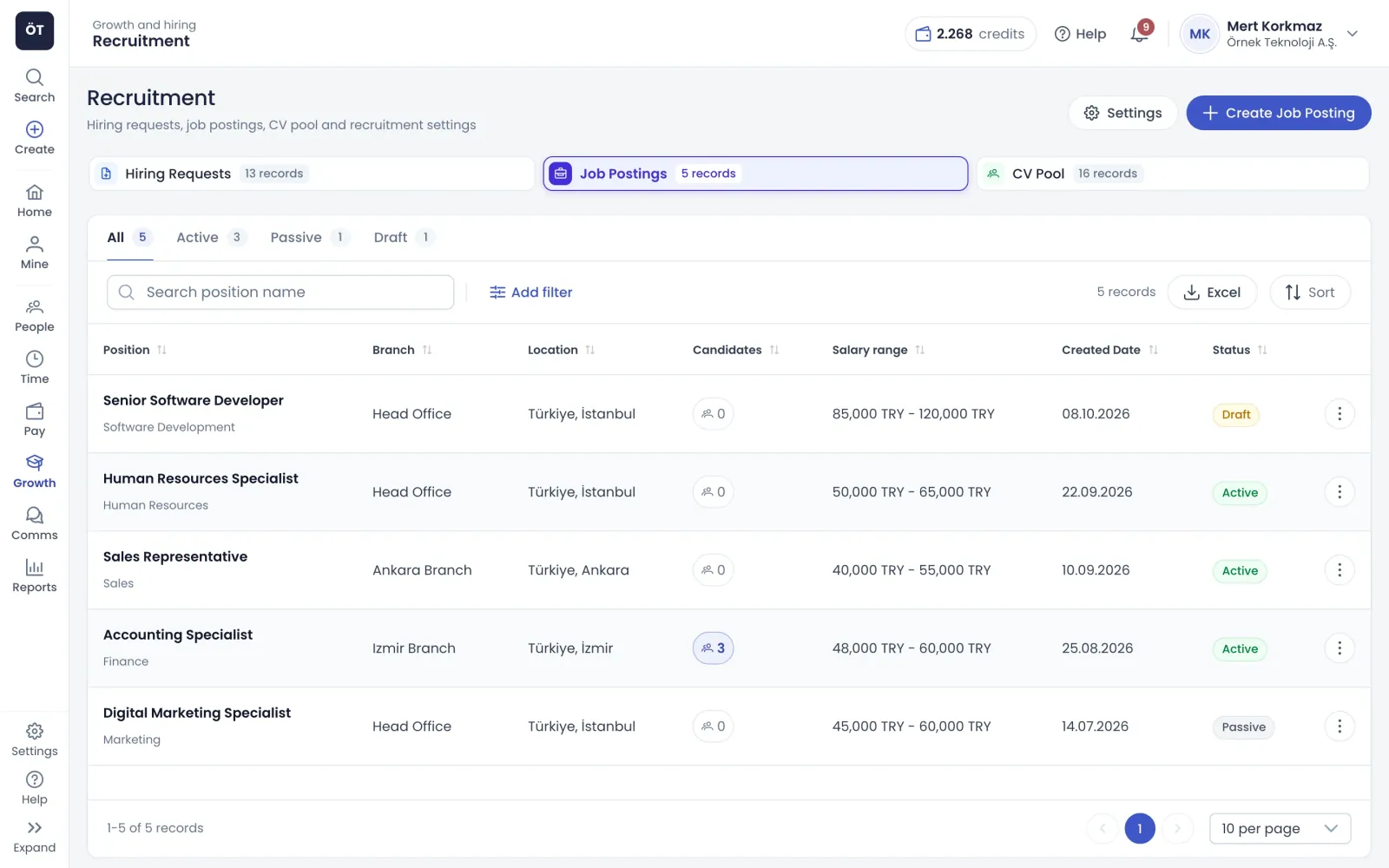
Job postings: position, branch, salary range, candidates and status
What's inside

What the applicant tracking system includes

The hiring screen has three tabs: hiring requests, job posts and the CV pool. Templates, integrations and career page links live on the settings page.

Requests and posts

From an approved hiring request to a live job post

A new position or a replacement starts as a hiring request and goes through your approval chain. Build the job post from the approved request, a saved template or from scratch. AI can write the description, and you can add screening questions. Published posts appear on your career page, and applications from the LinkedIn link you are given are tagged with LinkedIn as source.

  • The career page can be viewed in Turkish or English
  • Applicants consent to privacy and terms before applying
  • Posts are tracked as draft, live, paused or archived
  • Candidates move through stage columns with drag and drop
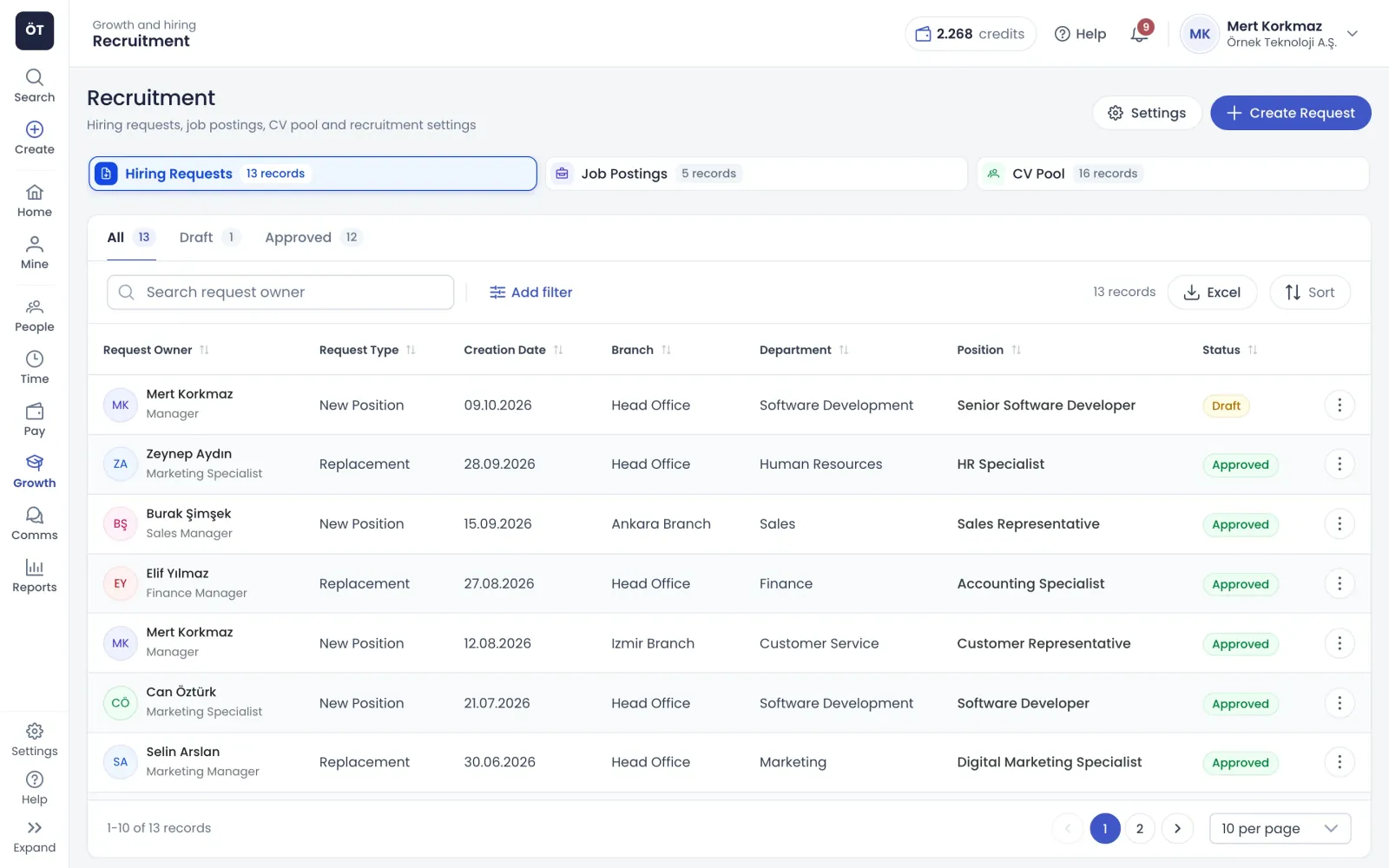
Hiring requests: request type, department, position and approval status
CV pool

CV pool, AI analysis and duplicate merging

Applications from the career page and CVs you upload land in the CV pool. AI parses each CV into standard fields, scores it against the skills you enter or a job description and writes a short summary. Applications from the same person are merged by email and phone, and possible duplicates are flagged for review.

  • Scores fall into excellent, good, fair and weak match bands
  • CVs of candidates who decline AI use are never analysed
  • All of a candidate's applications appear on one tab
  • AI scores support decisions, the final call is yours
Interviews

Weighted interview templates and scheduling

Give every question in an interview template a weight that adds up to one hundred. When scheduling, choose the interviewer, date, length and format: in person, Google Meet or Microsoft Teams. An availability calendar shows your busy slots. Interviewers only see candidates assigned to them, score each question, and the average score is calculated automatically.

  • Connect Google or Outlook to send calendar invites
  • Email candidates from your own account using templates
  • Hired candidates move to pre-boarding in one step
Roles

Every role on the hiring team has a clear scope

The applicant tracking system has its own roles, granted from the permissions screen.

Hiring admin

Handles every job post, candidate and hiring request. On the settings page they prepare post templates, screening questions, email and interview templates, set how long reserved candidates are kept and copy career page links.

  • Exports lists to Excel
  • Defines the approval chain from the module menu
  • Schedules interviews and emails candidates

Recruiter

Creates, publishes and copies job posts, uploads CVs and sends them for analysis, moves candidates between stages, marks favourites or reserves them, merges duplicates, schedules interviews and transfers hired candidates to pre-boarding.

  • Connects their own Google or Outlook account
  • Changes stages one by one or in bulk
  • Sends consent links to manually added candidates

Interviewer

Sees only candidates with an interview assigned to them, reviews their CV, analyses and history, and completes the evaluation. Interviewers cannot see job posts or add candidates, but they can raise a hiring request.

  • Each evaluation is saved once
  • Scores follow question weights
  • Assigned interviews are listed separately
How it works

Hiring in four steps

  1. Approve the request

    Raise the position need as a hiring request and send it through your company's approval chain.

  2. Publish the job

    Build the post from the approved request, let AI draft the description and publish it on your career page.

  3. Evaluate candidates

    Check AI scores in the CV pool, move candidates through stages and schedule interviews.

  4. Complete the hire

    Mark the candidate who accepts the offer as Hired and move them into pre-boarding in one step.

FAQ

Frequently asked questions about Applicant tracking system

Contact us
What does an applicant tracking system do?

An applicant tracking system manages hiring in one place. Teamso covers hiring requests and approvals, job posts published on your career page, applications collected in a CV pool, AI CV analysis, candidate stages, interview scheduling and evaluation, and transferring hired candidates into pre-boarding.

How does AI score CVs?

There are three analysis types. The basic parser splits a CV into fields such as contact details, experience and education. The skill set parser looks for the skills you enter. The job description parser compares the CV with a post or a text you provide. You get a match score, a summary and extracted skills, all meant to support your decision.

What happens when the same person applies twice?

If email and phone match, the records merge automatically. If only one matches and the name is the same, they also merge. If only one matches but other details differ, the record is flagged as a possible duplicate and you review a side-by-side comparison before merging. All applications then appear on one candidate.

Can I post jobs on LinkedIn?

Posts are not pushed to LinkedIn automatically. The publish window gives you a LinkedIn link to include in your LinkedIn post, and applications coming through it are tagged with LinkedIn as source in the CV pool. Posts are also published on the career page Teamso creates for you, which you can link from your website.

How are interviews evaluated?

The hiring admin builds interview templates whose question weights total one hundred. A template and an interviewer are chosen when scheduling. After the interview, the interviewer scores each question and can add comments; scores follow the weights and the average appears on the candidate record. Each interview is evaluated once.

How is candidate consent handled?

Applicants on the career page cannot apply without accepting the privacy agreement, terms and information notice; consent to AI use is optional. For candidates you add manually, you can send a consent link from the candidate panel. Consents are stored on the candidate panel with the date they were given.

Can interviewers see every candidate?

No. Employees with the interviewer role only see candidates with an interview assigned to them and only fill in that evaluation. They cannot see job posts or add candidates, so line managers can take part in hiring without access to more candidate data than they need.

Get started with Applicant tracking system

Try it free or explore the product with our team.

Request a demo