The module has four parts: the conversation screen where employees practise, evidence-based scoring, the scenario studio and the team results dashboard. Assignments, learning paths and certificates turn them into a structured training programme.
Conversation
Written or voice role play with an AI customer
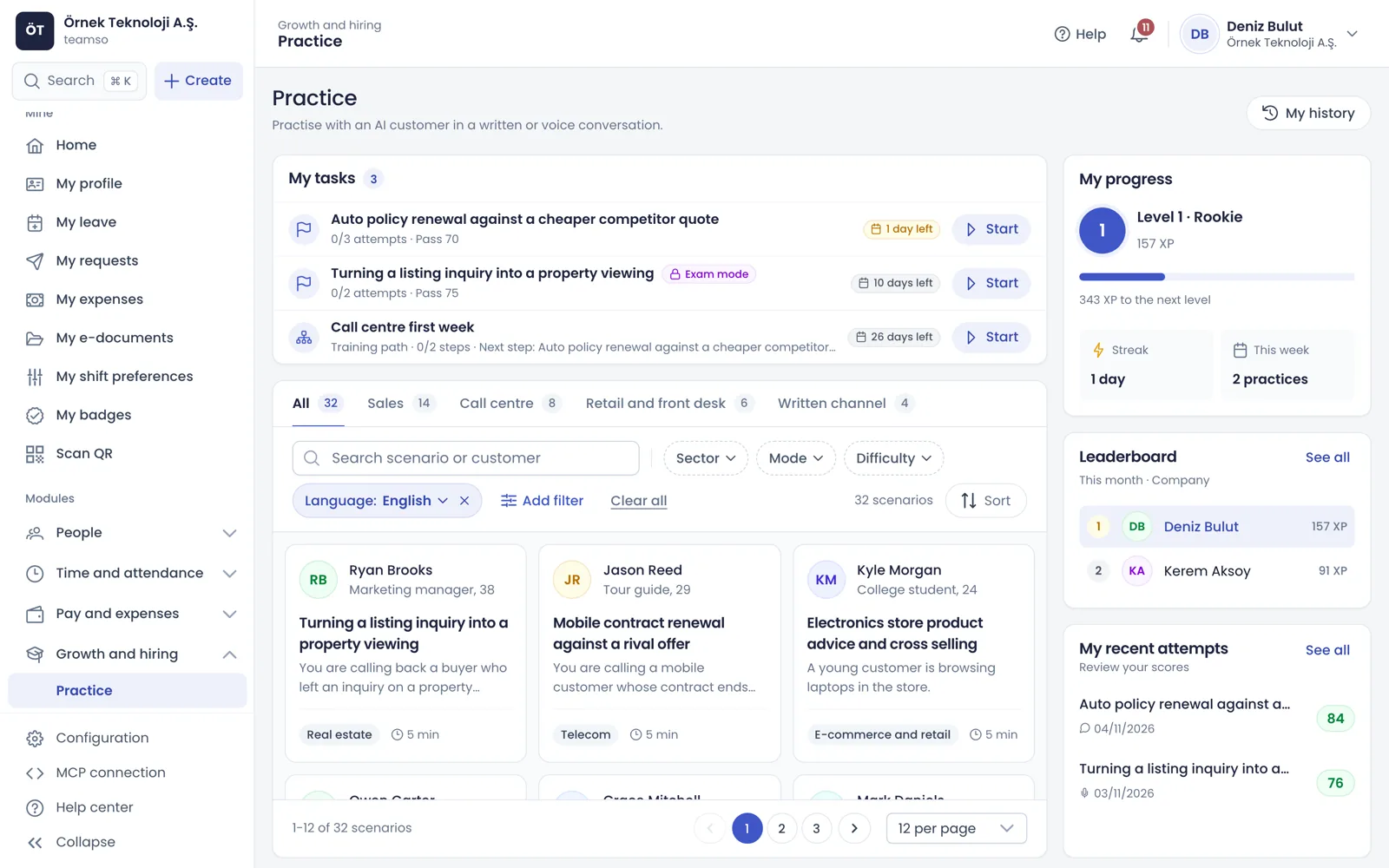
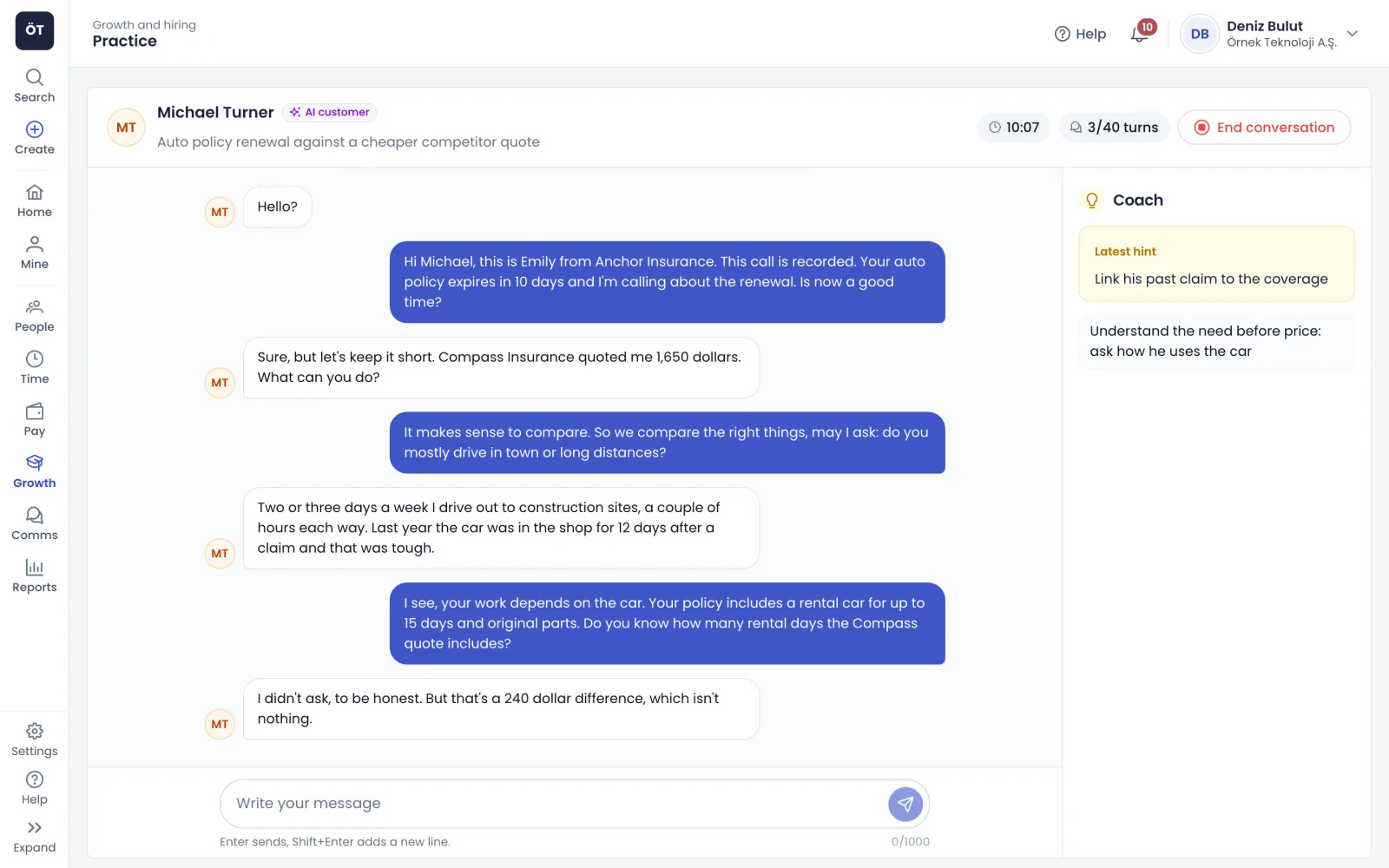
On the Practice page employees pick a scenario from sales, call centre, retail and front desk, chat or the management category. Before starting they read who the customer is and what their own task is, then choose a written or voice conversation and a difficulty. The AI customer answers according to the scenario's attitude, objections and hidden agenda, and in a voice call it stops talking when interrupted. With coach tips on, short hints appear next to the conversation.
Easy, medium and hard; the customer's mood changes with difficulty
Live captions and phone line audio in voice calls
No microphone? The same scenario continues in writing
An AI customer label stays on screen throughout
app.teamso.com
Scoring
An evidence-based score and feedback for every conversation
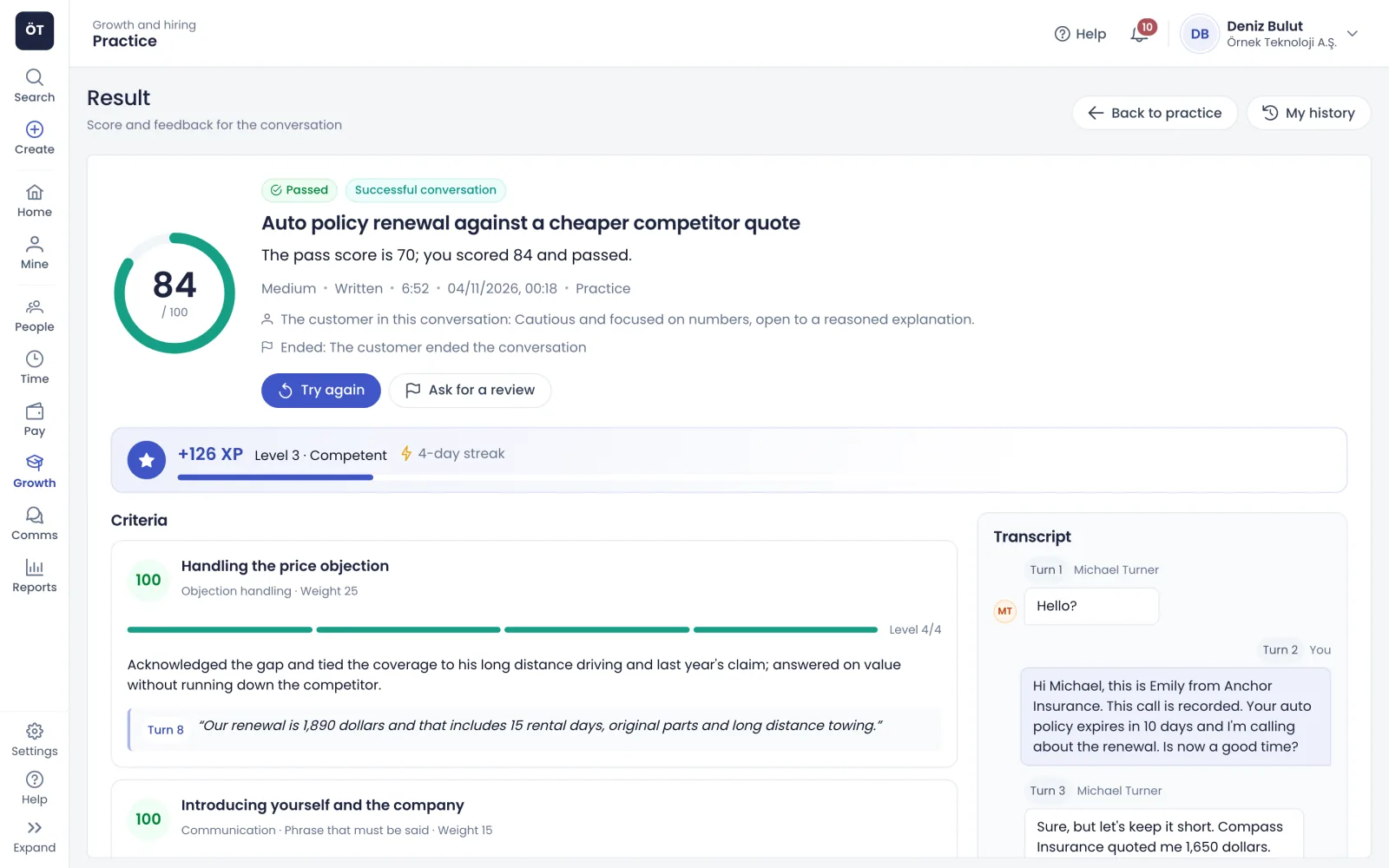
When the conversation ends an AI judge rates each criterion on a level from 0 to 4 and explains why with quotes from the conversation; clicking a quote opens that turn in the transcript. The result screen shows a score out of 100, pass or fail, strengths, priority areas and a better reply the employee could have given. Recommended practice brings up scenarios that train the weakest skill.
A criterion without a supporting quote gets level 1 at most
Scoring 0 on a critical criterion fails the conversation whatever the total
Metrics such as speaking pace and question count are for information only
app.teamso.com
Scenario studio
Build your own scenarios without code, or generate them with AI
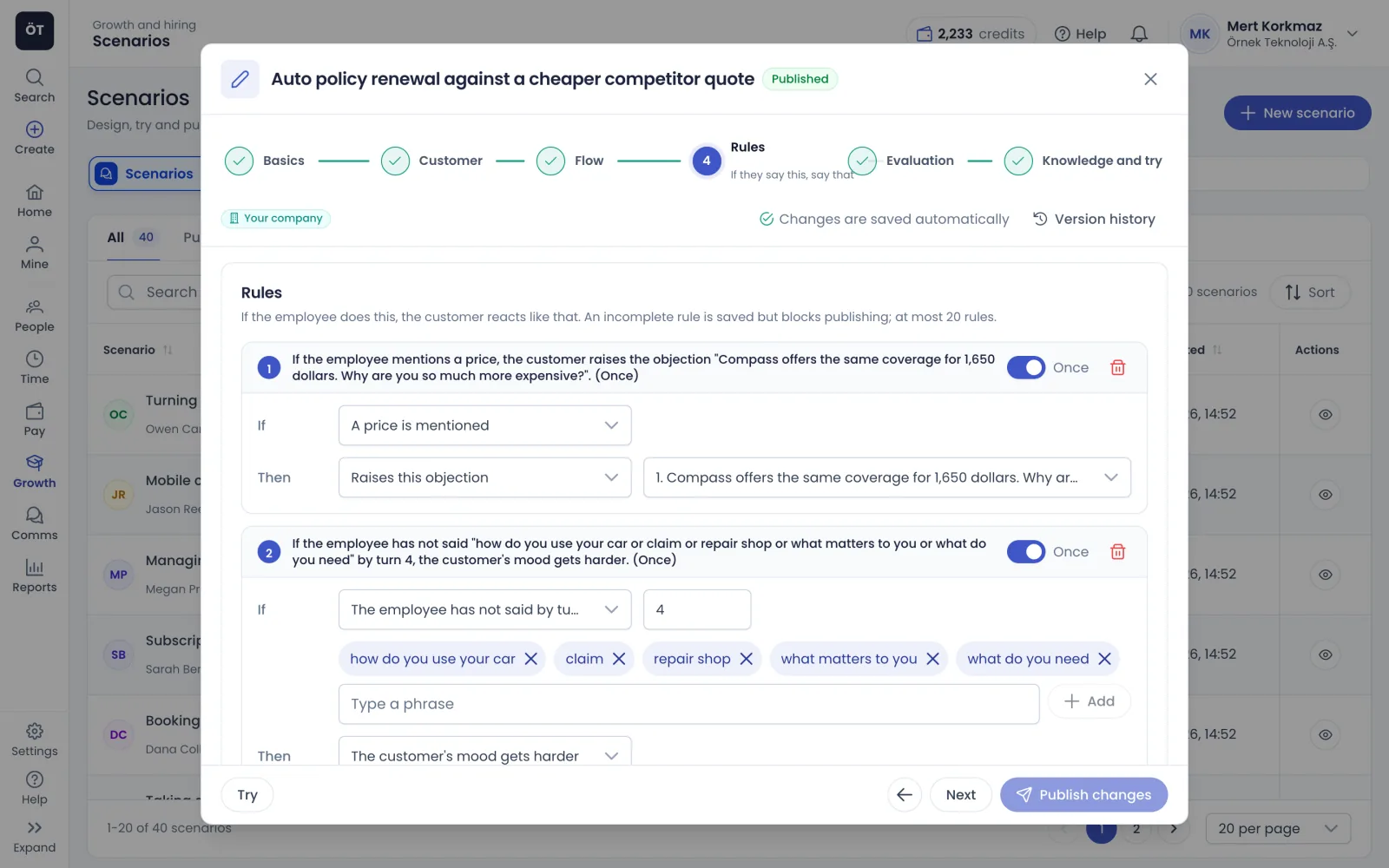
The ready-made library brings 40 scenarios in English and Turkish, from insurance and telecoms to e-commerce and healthcare. In the studio you build a scenario for your company step by step: who the customer is, their hidden agenda, objections, "if they say this, reply with that" rules and scoring criteria. Or describe the situation in one sentence, attach your product document and let AI generate the draft.
Scoring templates such as general sales, SPIN, BANT, LAER and HEARD
Try the draft yourself before you publish it
AI-generated drafts stay hidden from employees until you publish
Editing a published scenario creates a new version; past attempts keep theirs
app.teamso.com
Team results
See where your team struggles on a skill heatmap
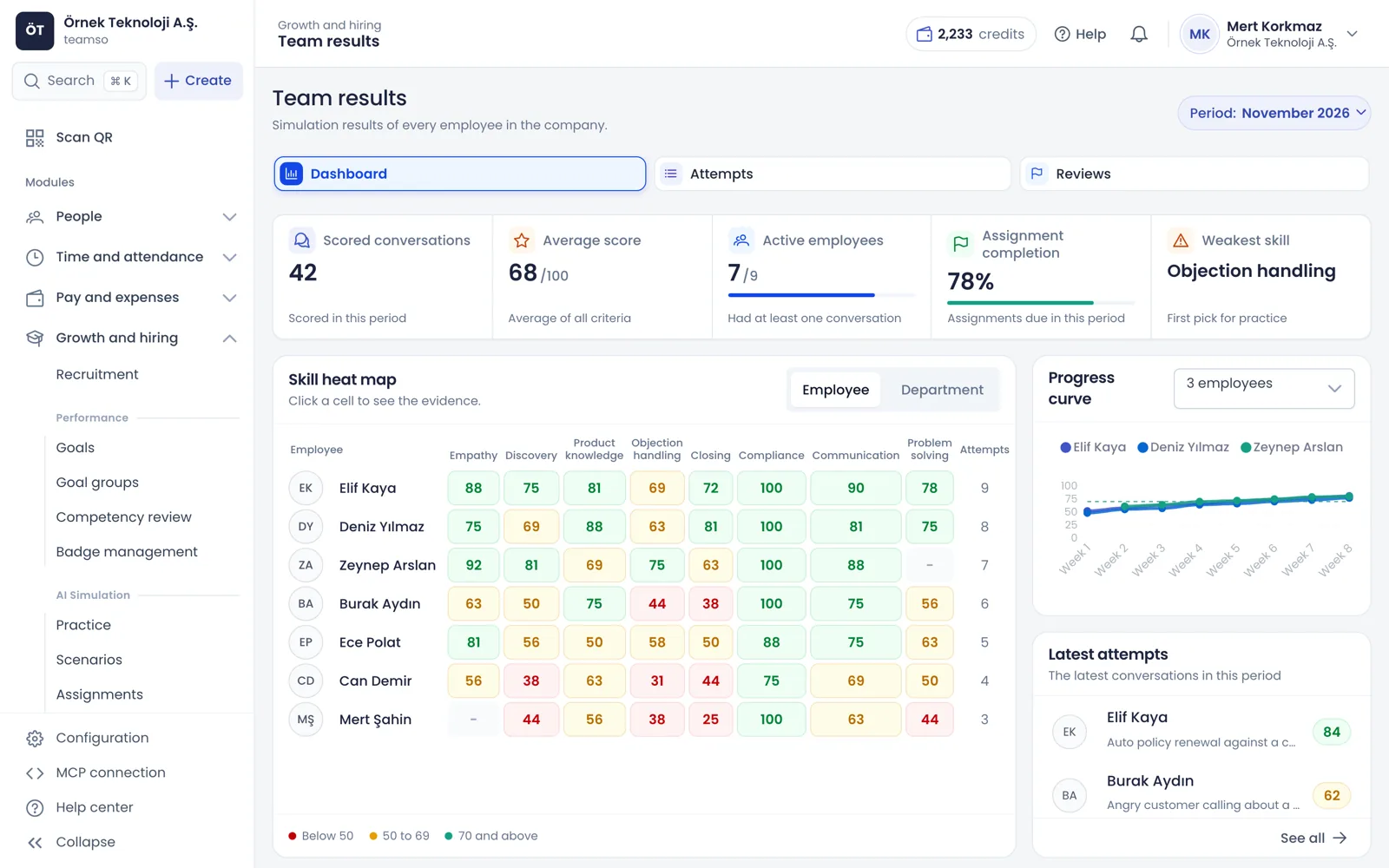
The team results dashboard shows scored conversations, the average score, assignment completion and the weakest skill for the period. The skill heatmap colours each employee across empathy, discovery, product knowledge, objection handling, closing, compliance, communication and problem solving. Click a cell to open that person's attempts and quotes for the skill, then assign practice straight from there.
Managers see only their direct reports
A progress curve plots each employee's weekly average score
Attempts export to Excel and simulation tables are available in reports
app.teamso.com
Programme
From one-off practice to a structured training programme
Assignments, learning paths, gamification and privacy settings shape practice into a programme that follows your company's rules.
Assignments, learning paths and certificates
Assign a scenario or learning path to people, the whole company, a branch, department or position with a due date, pass mark, attempt limit and exam mode, and set up automatic assignment for new joiners. A learning path is a sequence of 2 to 12 steps, and employees who finish it get a PDF certificate with a verification code.
Reminders 3 days and 1 day before the due date
Certificates never expire or last 6, 12 or 24 months
Progress is tracked per person and exports to Excel
XP, levels, streaks and a leaderboard
Every scored conversation earns XP weighted by difficulty; employees climb seven levels and keep a streak of working days with practice. The leaderboard is off by default, and when you turn it on employees can hide themselves. Automatic badge rules can react to passed simulations, skill scores, streaks and completed learning paths.
Up to 3 attempts per scenario per day earn XP
Preview attempts do not count towards XP or statistics
Simulation tasks and team readiness cards for the home page
Reviews and appeals
If your company allows appeals, employees can ask for a review within 14 days of scoring, and those who fail a certificate path can request one too. In the review queue a manager or admin sees the transcript and criteria side by side, corrects levels where needed and leaves a comment. Assignments, learning paths and XP update to the corrected score.
Inconsistent evaluations also land in the queue
The old level, new level, reviewer and comment are kept
Every score records the judging model and criteria version
Privacy notice and personal data masking
Employees read and acknowledge a privacy notice before their first conversation. Written messages, document summaries and AI scenario prompts are masked before they reach the AI provider, and transcripts are masked before they are stored: ID numbers, IBANs, card numbers, phone numbers and emails are replaced with labels. Audio recording is off by default and you set the retention periods.
No emotion detection from voice, face or tone
Scores are never tied automatically to bonus or promotion decisions
Employees who prefer not to speak can complete a voice assignment in writing
How it works
Get started with AI Simulation in four steps
Choose your settings
Decide on voice conversations, coach tips, the default pass mark, audio recording and retention periods, then give employees and managers their permissions.
Pick scenarios
Choose from the ready-made library, build your own in the studio or generate one with AI, and try it yourself before publishing.
Assign
Assign a scenario or learning path to people or teams with a due date and pass mark; employees can also practise without an assignment.
Track results
Spot weak skills on the team results dashboard, review appeals and assign practice that targets each development area.
Connected modules
Packages connected to AI Simulation
Simulation works together with employee data, badges and reports.
AI simulation is role play in which employees prepare for real conversations by talking to an AI customer in writing or by voice. The employee picks a scenario, reads who the customer is and what their task is, and holds the conversation. When it ends an AI judge scores it against your company's criteria, backs up each criterion with quotes from the conversation and suggests what to practise next.
Which conversations can employees practise?
The ready-made library has 40 scenarios across sales, call centre, retail and front desk, chat and management, each available in English and Turkish. Examples include a car insurance renewal, an angry customer chasing a late delivery, a subscription cancellation, a return without a receipt, a price question on WhatsApp, performance feedback and a conversation with an employee who wants to resign. You can also build scenarios for your own processes.
How is AI Simulation priced?
AI Simulation is sold as a separate package and usage is deducted from your company's digital credits. A written conversation uses 3 credits, each started minute of a voice conversation uses 4 credits and generating a scenario with AI uses 5 credits; coach tips and scoring are included. Credits for a written conversation that cannot be scored or has fewer than 2 messages are refunded. You set the monthly voice minutes per person in the settings.
How is the score calculated, and can employees appeal?
Each criterion gets a level from 0 to 4, the criterion score is 25 times the level and the total is weighted by criterion. A criterion with no supporting evidence in the conversation gets level 1 at most. If your company allows appeals, employees can ask for a review within 14 days of scoring; their manager or an admin reviews the conversation and criteria and corrects levels where needed.
Can we build scenarios for our own products and processes?
Yes. In the scenario studio you define the customer profile, hidden agenda, objections, product details, "if they say this, reply with that" rules and scoring criteria without writing code. You can copy and edit a ready-made scenario, or describe the situation in one sentence, attach your product brochure and let AI generate the draft. Drafts stay hidden from employees until you try and publish them.
What do voice conversations need?
An up-to-date browser on a computer or phone with a microphone is enough, and headphones are recommended. In the mobile app voice conversations need the current version with microphone support. Voice conversations must be turned on for your company; without a microphone, or if the employee prefers not to speak, the same scenario runs as a written conversation.
How is employees' personal data protected?
Employees read and acknowledge a privacy notice before their first conversation, covering the data processed, the purposes, retention periods and the use of AI. Written messages and document summaries are masked before they reach the AI provider, and transcripts are masked before they are stored. No emotion is inferred from voice or tone, audio recording is off by default and transcripts are deleted when their retention period ends.