
Internal communication tools from announcements to surveys

  • Announcements by email and SMS
  • AI survey drafts
  • Chatbot that answers from your files
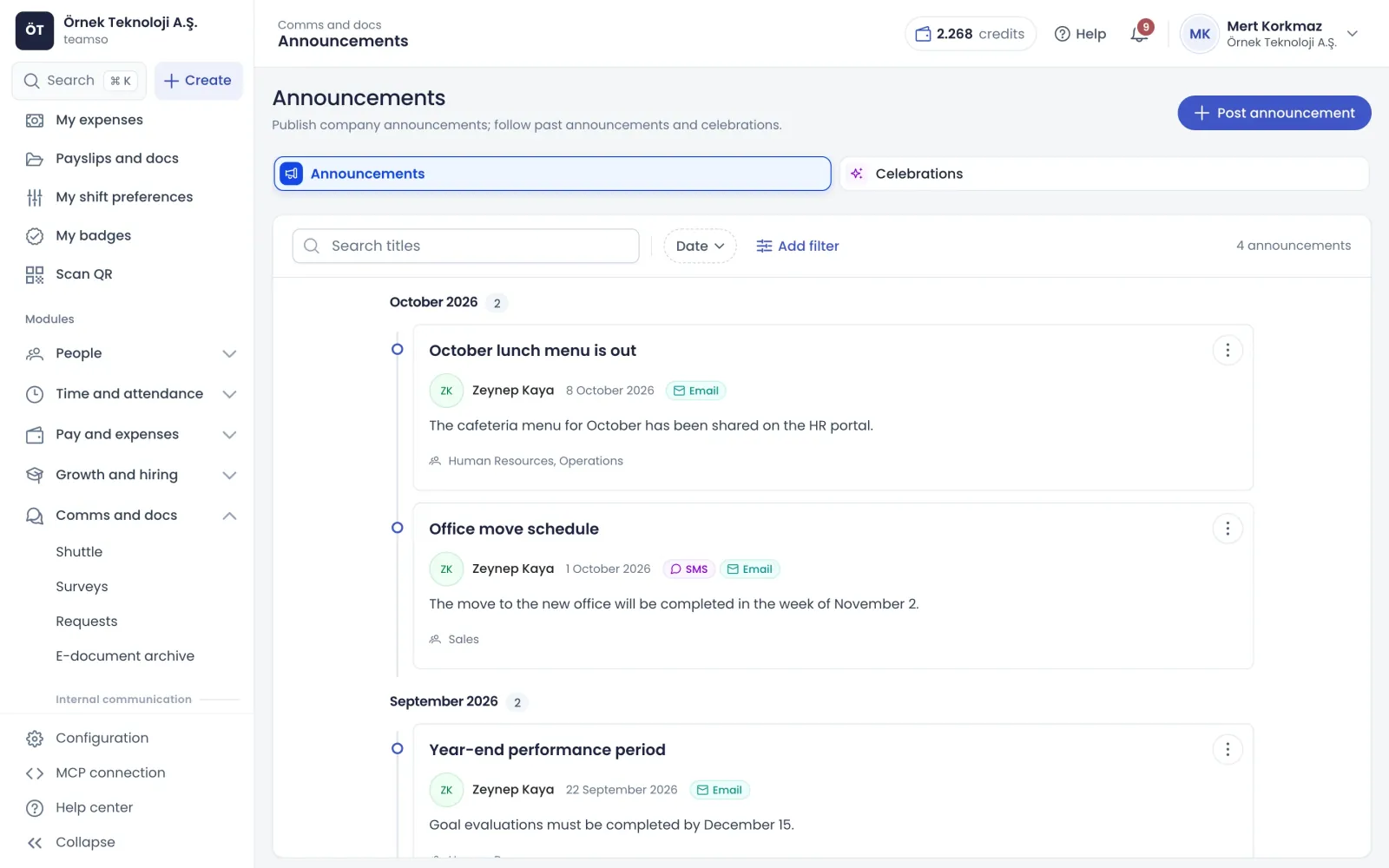
Announcements: timeline with delivery channels
What's inside

What the internal communication module includes

All screens sit together under the communication menu. Turn on what you need and leave the rest off.

News and surveys

Announcements with cover images and targeted surveys

Publish announcements with a cover photo and choose which departments receive them by email or SMS. For surveys, build sections and questions, pick recipients by branch, department, position or person, and set the send date and closing period. AI can draft the questions, answers can be anonymous and results can be exported.

  • Non-respondents get a reminder before the survey closes
  • An info address can be emailed on every new answer
  • Future-dated surveys go out automatically that morning
  • Announcements sent by SMS use digital credits
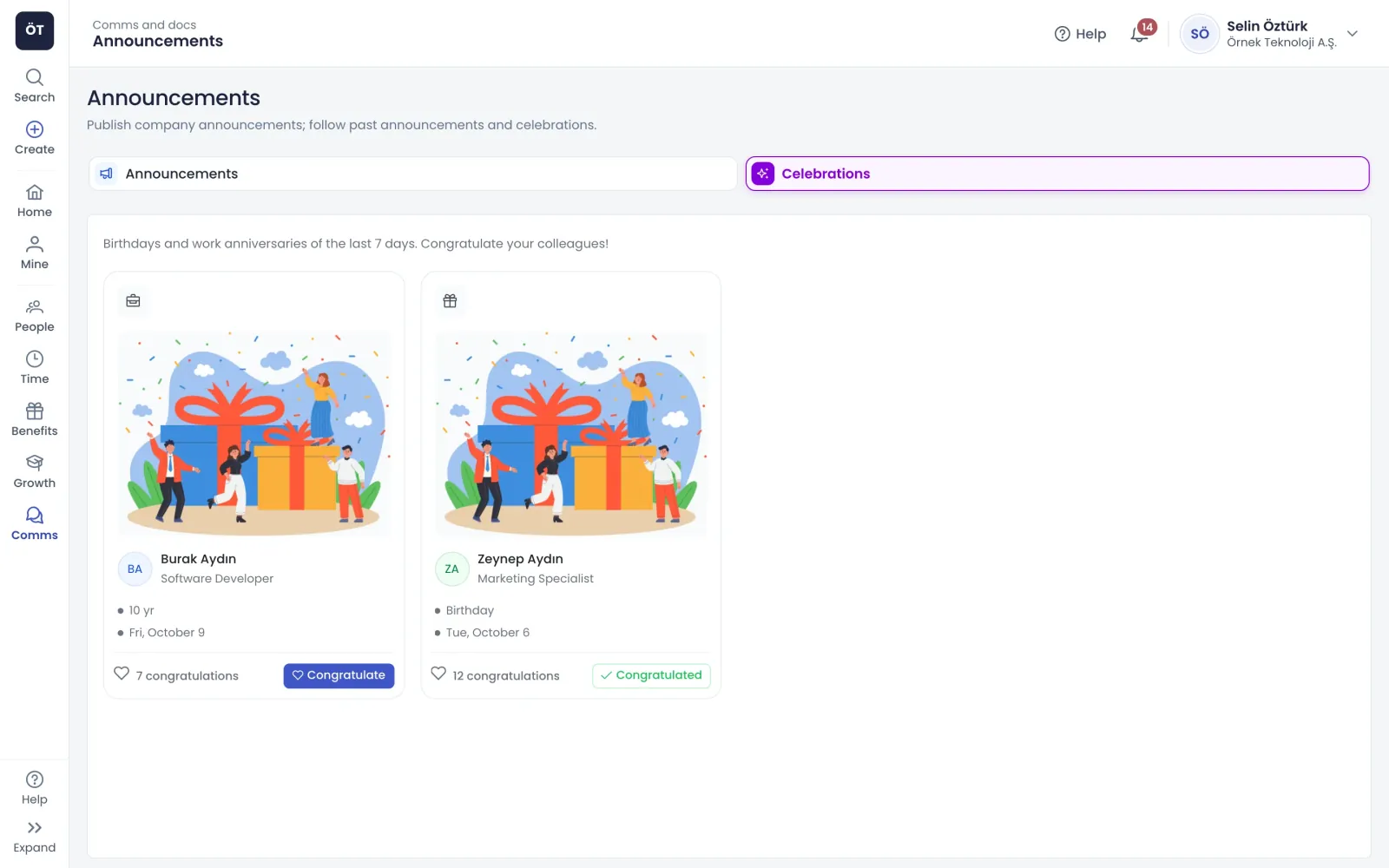
Celebrations: birthday and work anniversary cards
Chatbot

A chatbot that answers from your company documents

Upload your company documents, such as regulations, handbooks or question lists, to the chat assistant. Employees ask questions and the chatbot answers only from the uploaded documents. You decide who can use it and set a monthly question limit per employee, so repeat questions are answered before they reach HR.

  • If the documents lack the answer, the chatbot says so
  • Access and limits are managed in settings
  • Each message uses digital credits once the answer completes
Employee experience

Feedback, celebrations, partner perks and shuttles

Employees send suggestions, complaints or reports to HR, anonymously if they wish, and HR replies. Birthday and work anniversary emails go out automatically and colleagues leave congratulations in the celebrations feed. Partner perks are published with discount codes and shuttle routes with their stops. For content that needs a read acknowledgement, use company policies.

  • HR defines feedback types for your company
  • AI celebration content needs employee consent and approval
  • Admins are notified before a perk's validity ends
  • Shuttle announcements reach only riders of that shuttle
Screens

A dedicated screen for each communication need

Screens work independently, and permissions are granted from one place.

Partner perks

Add hospitals, gyms, schools, restaurants or insurers with logo, benefit, discount code, contact details, validity dates, audience and a brochure. Employees find them in the menu and on a home page card.

  • Perks can be featured and reordered
  • Expired perks are hidden from employees
  • Employees can be notified on publishing

Shuttle management

Define shuttle vehicles and stops and assign employees to a shuttle and stop. When a route or time changes, publish a shuttle announcement; employees see their own shuttle and stop in the app and get notified.

  • Shuttle announcements can also go by email
  • Employees only see their own shuttle details
  • Assignments are updated from one screen

Celebrations

Turn on birthday and work anniversary emails and set the audience and text. The celebrations tab on the announcements screen shows the last seven days of birthdays and anniversaries, and colleagues leave their wishes.

  • Emails go out every morning
  • A monthly limit applies to AI content
  • Dates are read from the employee registry
How it works

Set up internal communication in four steps

  1. Grant permissions

    Give communication admins the admin permission and people who only publish policies the policy permission.

  2. Prepare the screens

    Add feedback types, define shuttles and stops, and upload company documents for the chatbot.

  3. Switch on celebrations

    Enable birthday and anniversary emails and adjust the text and audience to your company.

  4. Start communicating

    Publish your first announcement, send a survey and follow and export answers from the survey screen.

FAQ

Frequently asked questions about Internal communication

Contact us
What tools does the internal communication module include?

Announcements, company policies, partner perks, feedback, shuttle management, surveys, a chatbot and celebrations, all under the communication menu. Users with the admin permission manage the screens, while employees with basic access read announcements, answer surveys, send feedback and ask the chatbot questions.

How do announcements reach employees?

When publishing, you choose target departments and channels. Active employees in those departments receive an email, an SMS or both, along with an in-app notification. The announcements screen lists all company announcements as a timeline. SMS uses digital credits, and if the balance is too low the announcement is not created.

Can AI help write employee surveys?

Yes. Choose Create with AI and enter the goal, an optional audience, between five and twenty questions, the tone and the language, and you get draft sections and questions. Edit the draft, set recipients, send date and closing period, and publish.

Can survey answers be anonymous?

Yes. With anonymous answers on, the list and answer screen show Anonymous instead of the employee's name, and notification emails leave the name out too. On the feedback screen, employees can also send anonymously, in which case the people replying do not see who sent it.

What does the company chatbot answer from?

Only from the documents you upload in the chat assistant settings. Upload documents on topics like leave policy, benefits or workplace rules and employees can ask the chatbot instead of writing to HR. You choose which employees can use it and set the monthly question limit.

Are birthday and anniversary celebrations automatic?

Yes. Once celebration emails are switched on, birthday and work anniversary emails go out every morning to the employee and the audience you choose. Dates come from the employee registry. AI can also produce a celebration image and video, used only with the employee's consent and after approval.

Do these tools work in the mobile app?

Yes. The Teamso mobile app opens the same screens, so employees read announcements, answer surveys, send feedback, check their shuttle and partner perks and congratulate colleagues. With Teamso MCP, employees can also list the announcements visible to them from an AI assistant.

Get started with Internal communication

Try it free or explore the product with our team.

Request a demo