
Employee benefits management

Employee benefits management with payments and deductions that reach payroll

With Teamso employee benefits management you set up benefits such as meal, travel, family and child allowances, payments such as bonuses, and deductions such as advances and union dues for each employee. Entries flow into payroll for the months you choose, while partner perks and shuttle management round out what you offer your people.

  • Hundreds of entries from one Excel file
  • Advance limit and instalment rules
  • Foreign currency converted at payroll
Benefits: payment type, payment period and amounts
What's inside

What employee benefits management covers

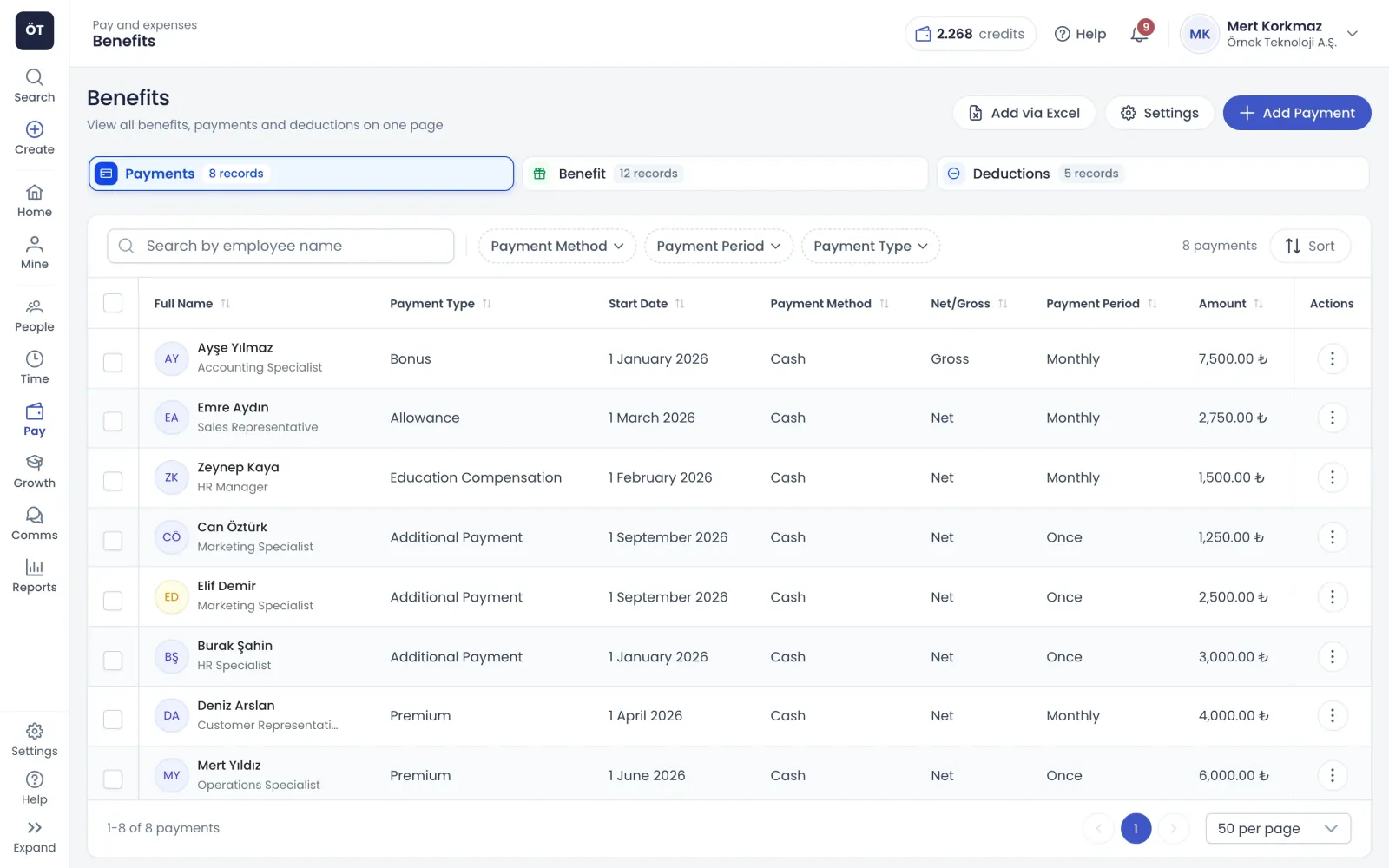
Benefits, payments and deductions live in three tabs of one screen, each stored with amount, payment method and period, ready for payroll.

Benefits

Define each benefit with amount, payment method and period

In the add benefit wizard you pick employees and a type, then enter a net or gross amount, a cash, in-kind or meal card payment method, and a one-off or monthly period. For meal and travel allowances, workdays come from the working calendar or the timesheet. For child allowance, the exemption is calculated separately for each child.

  • Give the same benefit to several employees at once
  • Child, birth, marriage and bereavement allowance types
  • Private insurance with insurance type and insured person
  • Closed payroll months cannot be selected
Payments

Bonuses and extra payments, advances and dues

The payments tab covers bonuses, annual bonuses, sales commission, board fees, salary difference pay, extra payments, travel allowances and cash handling allowance. The deductions tab handles advances, garnishments, union dues, alimony, pension fund, traffic fines and travel deductions. Advances take a total and an instalment count, and the monthly instalment is deducted in payroll.

  • Travel allowance with trip details and exempt amount
  • Deductions always entered as net amounts
  • Creditor and IBAN details for garnishment and alimony
  • Bulk delete and editing record by record
Excel

Bulk benefits, payments and deductions from Excel

In each tab, Add with Excel downloads a template pre-filled with the active employees you manage, with type, payment method and period chosen from drop-down lists. Monthly entries take a start and end month. The file is checked and rows to be saved, rows with errors and rows with warnings are shown separately. Nothing is saved while any error remains.

  • Up to 5000 rows in a single file
  • Up to 36 months on one row
  • Advance deductions upload with instalment counts
  • Filter to rows with errors or warnings only
Rules and perks

Benefit rules and perks for employees

Alongside the items that reach payroll, perks that touch employees' everyday lives are managed on the same platform.

Advance rules

Set how many times monthly salary can be advanced in a year, the minimum service period, maximum instalments, the yearly number of advances and the minimum days between advances. Advances that break a rule are not saved.

  • Rules checked in the wizard and in Excel uploads
  • Defaults apply to fields left empty
  • Up to 36 instalments per advance

Type management and foreign currency

Switch off the benefit, payment and deduction types your company does not use, and they disappear from entry screens. Amounts in US dollars, euros or pounds are converted to Turkish lira at the period rate when payroll is calculated.

  • Count of active types shown per section
  • Existing entries of a disabled type still reach payroll
  • Benefits and payroll share one exchange rate setting

Partner perks

Publish hospitals, gyms, schools, restaurants, insurers and other partners offering employee discounts, with logo, benefit, discount code, contact details and validity dates. Employees find them in the menu and on a home page card.

  • Target by branch, department or position
  • Feature, reorder and attach a brochure
  • Reminder 30 days before an agreement ends

Shuttle and transport

Add shuttle vehicles with capacity, driver phone and route stops. Employees are assigned to a shuttle and a stop, and no one can be added once capacity is full. Shuttle announcements reach assigned employees in-app and optionally by e-mail.

  • Move or skip employees already on another shuttle
  • Employees see their own shuttle and stop
  • Filter by occupancy and remaining capacity
How it works

Benefits management ready in four steps

  1. Grant permissions

    Give the benefits admin role to whoever enters benefits, payments and deductions; employees see their own entries.

  2. Choose types

    Switch on the benefit, payment and deduction types you use in settings and save your advance limit and instalment rules.

  3. Enter records

    Add entries one by one with the wizard or in bulk with the Excel template, and make sure payroll periods are open.

  4. Check in payroll

    Entries land in the payroll period for the chosen months, with benefits, payments and deductions in separate categories.

FAQ

Frequently asked questions about Employee benefits management

Contact us
Which benefits can be set up in employee benefits management?

Types include meal and travel allowances, family allowance, child, birth, marriage and bereavement allowances, education allowance and private insurance. In type management you switch on the ones your company uses and hide the rest. Each benefit is entered with a net or gross amount, a payment method and a one-off or monthly period.

How do benefits and bonuses reach payroll?

Benefit, payment and deduction entries are included automatically in payroll for the months you choose. One-off entries go into the month of the payment date, and monthly entries into every month selected. Closed payroll months cannot receive entries; if a correction is needed, the relevant payroll period has to be reopened first.

How do I import benefits in bulk from Excel?

Use Add with Excel on the relevant tab to download the template, which comes filled with the active employees you manage. Each row takes a type and amount, plus a payment date for one-off entries or a start and end month for monthly ones. The file is checked, errors are shown row by row, and all entries are saved at once when none remain.

How is a salary advance deducted?

In the deductions tab, choose advance and enter the total amount and number of instalments; the monthly instalment is calculated for you and the deduction date is the month of the first instalment. The entry is checked against your advance rules: salary multiple limit, minimum service, yearly number of advances and minimum days between them. Advances that break a rule are not saved.

Can benefits or bonuses be paid in foreign currency?

Yes. Benefits, payments and deductions can be entered in US dollars, euros or pounds as well as Turkish lira. Foreign currency amounts are converted at the rate for that payroll period when payroll is calculated, with rates managed automatically or manually in payroll currency settings. In-kind payments, meal cards and private insurance are lira only.

Can employees see their own benefits?

Yes. Employees with the basic benefits role see only their own entries in the payments, benefits and deductions tabs and can open the details, but cannot add or edit anything. They also see partner perks and their assigned shuttle on the relevant screens, with perks shown on a home page card as well.

How are partner perks and shuttle details managed?

Partner perks are published with logo, benefit, discount code, contact details, validity dates and target audience, and admins get a reminder 30 days before an agreement ends. On the shuttle screen you define vehicle capacity, driver phone and stops, assign employees to shuttles and stops, and send shuttle announcements to the people affected.

Get started with Employee benefits management

Try it free or explore the product with our team.

Request a demo